
Взлом: различия между версиями
Дополнительные действия
Rirma4ch (обсуждение | вклад) Нет описания правки |
Rirma4ch (обсуждение | вклад) Нет описания правки |
||
| Строка 10: | Строка 10: | ||
==Взлом== | ==Взлом== | ||
<div class="colstr-panel"> | |||
= | <div class="colstr-header">Шлюзы<span class="arrow">▼</span> | ||
</div> | |||
<div class="colstr-content"> | |||
[[File:door.png|64px|link=Airlock]] | [[File:door.png|64px|link=Airlock]] | ||
| Строка 116: | Строка 118: | ||
|The emergency light is off.||Аварийный доступ отключен (дверь проверяет доступ на карте). | |The emergency light is off.||Аварийный доступ отключен (дверь проверяет доступ на карте). | ||
|} | |} | ||
====Защищённые шлюзы==== | ====Защищённые шлюзы==== | ||
| Строка 151: | Строка 146: | ||
====Шлюзы с аварийным открытием==== | ====Шлюзы с аварийным открытием==== | ||
Некоторые отдельные шлюзы являются специальными "шлюзами с аварийным открытием", что означает, что их можно открыть голыми руками, после задержки, в обесточенном состоянии, а не с помощью [[Engineering_items#Crowbar|ломика<small>(crowbar)</small>]] [[File:Crowbar.png]]. Некоторые шлюзы в отсеках общественного пользования обладают такой опцией. | Некоторые отдельные шлюзы являются специальными "шлюзами с аварийным открытием", что означает, что их можно открыть голыми руками, после задержки, в обесточенном состоянии, а не с помощью [[Engineering_items#Crowbar|ломика<small>(crowbar)</small>]] [[File:Crowbar.png]]. Некоторые шлюзы в отсеках общественного пользования обладают такой опцией. | ||
</div> | |||
</div> | |||
<div class="colstr-panel"> | |||
<div class="colstr-header">АПЦ<span class="arrow">▼</span> | |||
</div> | |||
<div class="colstr-content"> | |||
===[[File:ModernAPC.png|64px|link=APC]] [[APC|АПЦ(<small>APC)</small>]]=== | ===[[File:ModernAPC.png|64px|link=APC]] [[APC|АПЦ(<small>APC)</small>]]=== | ||
| Строка 204: | Строка 204: | ||
|The AI connection light is on.||ИИ управляет этим АПЦ | |The AI connection light is on.||ИИ управляет этим АПЦ | ||
|} | |} | ||
</div></div> | |||
===[[File:autolathe.png|64px|link=Autolathe]][[File:techfab.png|64px|link=techfab]][[File:circuitimp.png|64px|link=circuitimp]] Печатающие | <div class="colstr-panel"> | ||
<div class="colstr-header">Печатающие машины<span class="arrow">▼</span> | |||
</div> | |||
<div class="colstr-content"> | |||
===[[File:autolathe.png|64px|link=Autolathe]][[File:techfab.png|64px|link=techfab]][[File:circuitimp.png|64px|link=circuitimp]] Печатающие машины=== | |||
#Кликните по машинерии, '''[[Engineering_items#Screwdriver|отвёрткой<small>(screwdriver</small>]]<small>)</small> [[File:Screwdriver_tool.png]]''' чтобы открыть панель. | #Кликните по машинерии, '''[[Engineering_items#Screwdriver|отвёрткой<small>(screwdriver</small>]]<small>)</small> [[File:Screwdriver_tool.png]]''' чтобы открыть панель. | ||
| Строка 228: | Строка 232: | ||
|'''Удачный взлом!'''||Выключает взломанные функции | |'''Удачный взлом!'''||Выключает взломанные функции | ||
|} | |} | ||
</div></div> | |||
<div class="colstr-panel"> | |||
<div class="colstr-header">Воздушная сигнализация<span class="arrow">▼</span> | |||
</div> | |||
<div class="colstr-content"> | |||
===[[File:AirAlarm.png|64px|link=Air_Alarm]] [[Air Alarm|Воздушная сигнализация<small>(Air Alarm)</small>]]=== | ===[[File:AirAlarm.png|64px|link=Air_Alarm]] [[Air Alarm|Воздушная сигнализация<small>(Air Alarm)</small>]]=== | ||
| Строка 271: | Строка 279: | ||
|Starts the alarm.||Nothing||Resets the alarm. | |Starts the alarm.||Nothing||Resets the alarm. | ||
|} | |} | ||
</div></div> | |||
<div class="colstr-panel"> | |||
<div class="colstr-header">Камеры<span class="arrow">▼</span> | |||
</div> | |||
<div class="colstr-content"> | |||
===[[File:Security_Camera.gif|64px|link=Security Camera]] [[Security Camera]]s=== | ===[[File:Security_Camera.gif|64px|link=Security Camera]] [[Security Camera]]s=== | ||
{{anchor|Cameras}} | {{anchor|Cameras}} | ||
| Строка 285: | Строка 297: | ||
The AI will receive a camera alert upon re-activation of a camera, or if it gets deactivated from brute force. | The AI will receive a camera alert upon re-activation of a camera, or if it gets deactivated from brute force. | ||
</div></div> | |||
<div class="colstr-panel"> | |||
<div class="colstr-header">Киборги<span class="arrow">▼</span> | |||
</div> | |||
<div class="colstr-content"> | |||
===[[File:Generic_borg.png|64px|link=Cyborg]] [[Cyborg|Cyborgs]]=== | ===[[File:Generic_borg.png|64px|link=Cyborg]] [[Cyborg|Cyborgs]]=== | ||
| Строка 336: | Строка 352: | ||
It's also a dick move to blow a non rogue borg. Think of it as chopping someone's arms and legs off; you'll get bwoink'd unless you did it for a good reason. | It's also a dick move to blow a non rogue borg. Think of it as chopping someone's arms and legs off; you'll get bwoink'd unless you did it for a good reason. | ||
</div></div> | |||
<div class="colstr-panel"> | |||
<div class="colstr-header">Мулботы<span class="arrow">▼</span> | |||
</div> | |||
<div class="colstr-content"> | |||
===[[File:MULE.gif|64px|link=quartermaster#Requisition_Me_a_Beat(ing)]] [[quartermaster#Requisition_Me_a_Beat(ing)|MULEbot]]=== | ===[[File:MULE.gif|64px|link=quartermaster#Requisition_Me_a_Beat(ing)]] [[quartermaster#Requisition_Me_a_Beat(ing)|MULEbot]]=== | ||
{{anchor|MULE}} | {{anchor|MULE}} | ||
| Строка 370: | Строка 390: | ||
|Allows non-standard cargo (people, cyborgs, and other bots).||Disables.||''The load platform clunks.'' -message. | |Allows non-standard cargo (people, cyborgs, and other bots).||Disables.||''The load platform clunks.'' -message. | ||
|} | |} | ||
</div></div> | |||
<div class="colstr-panel"> | |||
<div class="colstr-header">Консоль заказа товаров<span class="arrow">▼</span> | |||
</div> | |||
<div class="colstr-content"> | |||
==={{anchor|Supply Shuttle Console}}[[File:Supply_Shuttle_Console.png|64px]][[Computers#Supply_Shuttle_Console|Supply Shuttle Console]]=== | ==={{anchor|Supply Shuttle Console}}[[File:Supply_Shuttle_Console.png|64px]][[Computers#Supply_Shuttle_Console|Supply Shuttle Console]]=== | ||
| Строка 390: | Строка 414: | ||
#Use your screwdriver to enable the hidden priority level. | #Use your screwdriver to enable the hidden priority level. | ||
#Close the panel with your crowbar. | #Close the panel with your crowbar. | ||
</div></div> | |||
<div class="colstr-panel"> | |||
<div class="colstr-header">Ускоритель частиц<span class="arrow">▼</span> | |||
</div> | |||
<div class="colstr-content"> | |||
===[[Particle Accelerator]]=== | ===[[Particle Accelerator]]=== | ||
| Строка 442: | Строка 470: | ||
Can easily be done in <30 seconds | Can easily be done in <30 seconds | ||
</div></div> | |||
<div class="colstr-panel"> | |||
<div class="colstr-header">Эмиттеры<span class="arrow">▼</span> | |||
</div> | |||
<div class="colstr-content"> | |||
===[[File:Emitter_On.gif|64px]] Particle Emitter=== | ===[[File:Emitter_On.gif|64px]] Particle Emitter=== | ||
There is only one wire: Pulse it to fire the emitter. | There is only one wire: Pulse it to fire the emitter. | ||
</div></div> | |||
<div class="colstr-panel"> | |||
<div class="colstr-header">Бомбы<span class="arrow">▼</span> | |||
</div> | |||
<div class="colstr-content"> | |||
===[[File:Syndicate_Bomb.gif|64px|link=Syndicate Bomb]] [[Syndicate Bomb]]=== | ===[[File:Syndicate_Bomb.gif|64px|link=Syndicate Bomb]] [[Syndicate Bomb]]=== | ||
| Строка 516: | Строка 552: | ||
#Click the bomb with [[Engineering_items#Wirecutters|wirecutters]] [[File:Wirecutters.png]] and cut all wires. | #Click the bomb with [[Engineering_items#Wirecutters|wirecutters]] [[File:Wirecutters.png]] and cut all wires. | ||
#Use a [[Engineering_items#Crowbar|crowbar]] [[File:Crowbar.png]]on the bomb to pry out the payload. | #Use a [[Engineering_items#Crowbar|crowbar]] [[File:Crowbar.png]]on the bomb to pry out the payload. | ||
</div></div> | |||
<div class="colstr-panel"> | |||
<div class="colstr-header">С4<span class="arrow">▼</span> | |||
</div> | |||
<div class="colstr-content"> | |||
===[[File:C4.gif|64px|link=Syndicate_Items#Plastic_Explosive_charge_(C4)]] [[Syndicate_Items#Plastic_Explosive_charge_(C4)|Plastic Explosives (C4)]]=== | ===[[File:C4.gif|64px|link=Syndicate_Items#Plastic_Explosive_charge_(C4)]] [[Syndicate_Items#Plastic_Explosive_charge_(C4)|Plastic Explosives (C4)]]=== | ||
| Строка 535: | Строка 575: | ||
|Explodes.||Nothing.||Explodes. | |Explodes.||Nothing.||Explodes. | ||
|} | |} | ||
</div></div> | |||
=== | <div class="colstr-panel"> | ||
<div class="colstr-header">Вендоматы<span class="arrow">▼</span> | |||
</div> | |||
<div class="colstr-content"> | |||
===[[File:Vendmed.gif|64px|link=Vending machines]] [[Vending machines|Vending Machines]]=== | |||
The only thing worth hacking! | The only thing worth hacking! | ||
| Строка 573: | Строка 617: | ||
|Causes the machine to electrocute people (shown by an orange light).||Restores.||Electrifies the machine for 30 seconds. | |Causes the machine to electrocute people (shown by an orange light).||Restores.||Electrifies the machine for 30 seconds. | ||
|} | |} | ||
</div></div> | |||
<div class="colstr-panel"> | |||
<div class="colstr-header">Защищенные хранилища<span class="arrow">▼</span> | |||
</div> | |||
<div class="colstr-content"> | |||
===[[File:secure.png|64px]] [[File:safe.png|64px]] Secure Briefcase, Wall Safe=== | ===[[File:secure.png|64px]] [[File:safe.png|64px]] Secure Briefcase, Wall Safe=== | ||
| Строка 583: | Строка 631: | ||
<br> | <br> | ||
Click R to lock it. Locking works even if no code has been set. You can set a new code with the above steps even if it's locked. Alt-click an unlocked briefcase/safe to open it. | Click R to lock it. Locking works even if no code has been set. You can set a new code with the above steps even if it's locked. Alt-click an unlocked briefcase/safe to open it. | ||
</div></div> | |||
<div class="colstr-panel"> | |||
<div class="colstr-header">Сейф<span class="arrow">▼</span> | |||
</div> | |||
<div class="colstr-content"> | |||
===[[File:Vaultsafe.png|64px]] Safe === | ===[[File:Vaultsafe.png|64px]] Safe === | ||
| Строка 590: | Строка 642: | ||
#Spin the dial in the other direction until you hear a "tonk", "krunk", or "plunk" and a "Spring", "Sprang", "Sproing", "Clunk", or "Krunk" from the safe. | #Spin the dial in the other direction until you hear a "tonk", "krunk", or "plunk" and a "Spring", "Sprang", "Sproing", "Clunk", or "Krunk" from the safe. | ||
#Open. | #Open. | ||
</div></div> | |||
<div class="colstr-panel"> | |||
<div class="colstr-header">Радио<span class="arrow">▼</span> | |||
</div> | |||
<div class="colstr-content"> | |||
===[[File:Station_Bounced_Radio.png|64px|link=Station_Bounced_Radio]] [[File:Wallradio.png|64px|link=Intercom]] [[Station_Bounced_Radio|Radio]]/[[Intercom]]=== | ===[[File:Station_Bounced_Radio.png|64px|link=Station_Bounced_Radio]] [[File:Wallradio.png|64px|link=Intercom]] [[Station_Bounced_Radio|Radio]]/[[Intercom]]=== | ||
| Строка 618: | Строка 674: | ||
| Nothing.||Nothing.||Toggles both the microphone and speaker on/off. | | Nothing.||Nothing.||Toggles both the microphone and speaker on/off. | ||
|} | |} | ||
</div></div> | |||
<div class="colstr-panel"> | |||
<div class="colstr-header">Офицерская маска<span class="arrow">▼</span> | |||
</div> | |||
<div class="colstr-content"> | |||
===[[File:Security_Gas_Mask.png|64px|link=Security_gas_mask#Security_Gas_Mask]] [[Security_gas_mask#Security_Gas_Mask|Security Gas Mask]]=== | ===[[File:Security_Gas_Mask.png|64px|link=Security_gas_mask#Security_Gas_Mask]] [[Security_gas_mask#Security_Gas_Mask|Security Gas Mask]]=== | ||
| Строка 626: | Строка 686: | ||
Turn the setting to BEEPSKY MODE by using an [[File:Emag.png]] [[Emag]]. | Turn the setting to BEEPSKY MODE by using an [[File:Emag.png]] [[Emag]]. | ||
</div></div> | |||
<div class="colstr-panel"> | |||
<div class="colstr-header">Хранилища костюмов<span class="arrow">▼</span> | |||
</div> | |||
<div class="colstr-content"> | |||
===[[File:Suit_Storage_Unit.png|64px|link=Suit Storage Unit]] [[Suit Storage Unit]]=== | ===[[File:Suit_Storage_Unit.png|64px|link=Suit Storage Unit]] [[Suit Storage Unit]]=== | ||
| Строка 674: | Строка 738: | ||
The wires may all get cut after decontaminating on high power, or mended if already cut. | The wires may all get cut after decontaminating on high power, or mended if already cut. | ||
</div></div> | |||
<div class="colstr-panel"> | |||
<div class="colstr-header">Тесла катушки<span class="arrow">▼</span> | |||
</div> | |||
<div class="colstr-content"> | |||
===[[File:Tesla_coil.gif|64px]] Tesla Coil=== | ===[[File:Tesla_coil.gif|64px]] Tesla Coil=== | ||
Only one wire: Pulse it to trigger a tesla shock. Great if you attach a remote signaler! | Only one wire: Pulse it to trigger a tesla shock. Great if you attach a remote signaler! | ||
</div></div> | |||
==Tips== | ==Tips== | ||
Версия от 14:53, 20 сентября 2025

Ваши инструменты
 Изолированные перчатки для полного гашения ударов током.
 Grey Bull делает вас неуязвимым к ударам тока на короткое время
  Отвёртка для вскрытия панелей. Полезный инструмент.
 Кусачки для резки[Cut] и соединения[Mend] проводов.
 Мультитул для дачи импульса[Pulse] по проводам. Не обязателен для большинства взломов, но очень упрощает жизнь.
 Cигналлер можно использовать как колхозную альтернативу мультитулу и для дистанционной подачи импульсов на провода. Прикрепите(attach) один из них к проводу, а затем используйте второй сигналлер для подачи импульсов на этот провод.
 Чертежи станции содержат в себе информацию о всех проводах во взламываемых устройствах. Крайне полезная вещь, если вы не хотите заниматься ручным перебором всех проводов во всех устройствах.

Взлом
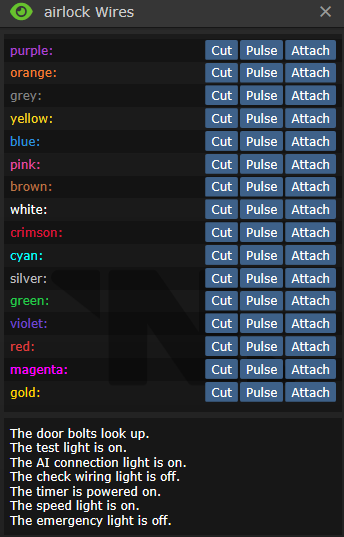
Провода магическим образом меняются местами в начале каждой смены ДЛЯ КАЖДОГО ОТДЕЛА. Например, если оранжевый провод переключает болты на шлюзе в инженерном отделе, то этот же провод будет делать то же самое на других шлюзах, НО ТОЛЬКО В ЭТОМ ЖЕ ОТДЕЛЕ.
Помните, что отключение питания двери приведет к прекращению работы всего остального.
- Держа отвёртку в руках, откройте панель шлюза, чтобы обнажить провода управления.
- Нажмите с помощью мультитулаили кусачек , чтобы получить доступ к проводам.
- Держа мультитул в активной руке, нажмите [pulse] чтобы подать импульс на провод, или держа кусачки нажмите [cut] чтобы разрезать провод.
- Снова возьмите отвёртку чтобы закрутить панель обратно.


- В шлюзе имеются два основных и два дополнительных провода питания.
- Отключение любого основного провода питания (импульсом или перекусыванием) приведет к тому, что резервное (aux) питание заработает через 10 секунд. Отключение как основного, так и вспомогательного провода питания приведет к потере питания двери до тех пор, пока не будет восстановлено основное или вспомогательное питание.
- Когда дверь обесточена, её можно открыть при помощи Ломика
 , если конечно болты не выдвинуты.
- Когда дверь обесточена, её можно открыть при помощи Ломика
- Отключение провода контроля ИИ приведёт к невозможности взаимодействия с этой дверью ИИ и киборгов. Однако, они всё равно смогут взломать эту дверь рано или поздно. Процесс занимает около минуты, позволяя синтетикам пользоваться дверью, даже если соответствующий провод отключен.
| Название | Cut | Mending | Pulse |
|---|---|---|---|
| Main Power (2 wires) | Отключает основное питание. Может ударить током, но не электризует дверь. | Восстанавливает основное питание шлюза. Может ударить током, но не электризует дверь. | Отключает основное питание на минуту. Повторный импульс бесполезный. |
| Auxiliary Power (2 wires) | Отключает резервное питание. Может ударить током, но не электризует дверь. | Восстанавливает резервное питание шлюза. Может ударить током, но не электризует дверь. | Отключает резервное питание на минуту. Повторный импульс бесполезный. |
| ID Scan | Дверь отказывает в доступе всем без исключений, если на её плате есть хоть какие-то ограничения. Однако, если в таком состоянии дать импульс на провод open(открытие), дверь распахнётся. | Восстанавливает прежний режим работы сканера ID. | Дверь будет пищать и мигать лампочками, будто к её пытается открыть кто-то без доступа. |
| Bolts | Опускает болты. | - | Меняет положение болтов. |
| Bolt Lights | Отключает индикацию состояния болтов. Делая невозможным визуальное определение их положения. | Возвращает индикацию в рабочее состояние. | Переключает индикацию, но не сами болты. |
| Open | - | - | Открывает дверь, но только если на плате управления конкретной двери не установлено никаких ограничений, либо провод ID scan(сканирование ID) перерезан. |
| AI Connection | Отключает синтетикам возможность управления дверью. | Возвращает синтетикам возможность управления дверью. | На мгновение отбирает у ИИ контроль. |
| High Voltage Ground (the "shock" wire) | Наэлектризовывает дверь. Является защитным механизмом от взлома. При попытке любых взаимодействий с дверью, оная бьёт током взломщика и искрит, привлекая внимание. Чем больше резервная мощность в электросети станции, тем сильнее удар током. | Снимает электрификацию. | Электризует дверь на 30 секунд. |
| High Voltage Circuit (2 wires) | С высокой вероятностью бьёт взломщика током, но не электризует дверь. | С высокой вероятностью бьёт взломщика током, но не электризует дверь. | - |
| Safety | Отключает датчик присутствия, позволяя двери закрываться, даже если в ней кто-то стоит. | Возвращает датчик в рабочее положение. | Переключает режим датчика. |
| Timing | Отключает таймер, отвечающий за закрытие двери. После открытия дверь больше не закроется, пока её не закроют в ручную, при наличии соответствующего доступа. | Возвращает таймер в рабочее положение. | Переключает время до закрытия.
Выкл - долгое закрытие Вкл - быстрое закрытие Невозможно переключить, если провод обрезан. |
| Nothing (2 wires) | - | ||
| Название лампочки | Статус | Это значит что... |
|---|---|---|
| Bolts | The door bolts look up. | Болты подняты (открыто). |
| The door bolts have fallen! | Болты опущены (блокировка). | |
| Power | The test light is on. | Есть питание |
| The test light is off. | Дверь обесточена (можно открыть при помощи лома  ). ).
| |
| AI Connection | The AI connection light is on. | ИИ контролирует дверь в штатном режиме. |
| The AI connection light is off. | ИИ не может контролировать дверь. | |
| Safety | The 'Check Wiring' light is on. | Датчик присутствия отключен (дверь крошит экипаж). |
| The 'Check Wiring' light is off. | Датчик присутствия включен (дверь не крошит экипаж). | |
| Timer | The timer is powered on. | Дверь может закрыться сама. |
| The timer is powered off. | Дверь не может закрыться сама. | |
| Timing | The speed light is on. | Дверь на долгой задержке (закрывается через время). |
| The speed light is off. | Дверь на короткой задержке (закрывается как только через неё прошли). | |
| Emergency light | The emergency light is on. | Включен аварийный доступ (дверь откроется даже тому у кого нет карты). |
| The emergency light is off. | Аварийный доступ отключен (дверь проверяет доступ на карте). |
Защищённые шлюзы
Некоторые шлюзы имеют защиту от взлома, в виде листа прочного материала между крышкой панели и проводами. Степень защиты можно определить осмотрев шлюз. Всего их три:
- Малая защита
Просто шлюз с панелью. Взламывается без дополнительных действий
- Средняя защита
Чтобы защитить панель шлюза, примените два листа металла на шлюзе с открытой панелью.
Не меняет уровень прочности самой двери.
Чтобы получить доступ к проводам такой двери нужно:
- Открыть панель отвёрткой(screwdriver) .
- Срезать лист защиты с помощью сварки(welding tool)
 .
. - Продолжайте как на двери с малой защитой.

- Высокая защита
Чтобы максимально защитить панель шлюза, примените два листа пластали на шлюзе с открытой панелью.
Прочность двери умножается на 1,5, при такой защите.
Чтобы получить доступ к проводам такой двери нужно:
- Открыть панель отвёрткой(screwdriver) .
- Перекусить высоковольтную сетку кусачками(wirecutters) . Очевидно, что вас ударит током, если делать это без перчаток.
- Срезать лист внешней защиты с помощью сварки(welding tool) .
- Удалить срезанный лист ломом(crowbar) .
- Срезать лист внутренней защиты с помощью сварки(welding tool) .
- Удалить срезанный лист ломом(crowbar) .
- Продолжайте как на двери с малой защитой.
Шлюзы с аварийным открытием
Некоторые отдельные шлюзы являются специальными "шлюзами с аварийным открытием", что означает, что их можно открыть голыми руками, после задержки, в обесточенном состоянии, а не с помощью ломика(crowbar) . Некоторые шлюзы в отсеках общественного пользования обладают такой опцией.

Контролирует электропитание в назначенном помещении. Все АПЦ могут управляться через компьютеры мониторинга питания, независимо от состояния блокировки, так что надейтесь, что тот, кто возится с питанием, не обращает на это внимания.
- Возьмите Отвертку(screwdriver) в руки, нажмите на АПЦ, чтобы открыть панель и обнажить проводку.
- Свободной рукой получите доступ к проводам.
- Мультитулом(multitool) пульсируйте провода, чтобы узнать что они делают, а кусачками(wirecutters) режьте.
- Закрутите(screwdriver) панель на место, после получения желаемого (см. таблицу ниже) результата.
- Блокировка крышки АПЦ не позволит получить доступ к аккумулятору. Крышка автоматически блокируется при закрытии. Открывать и закрывать крышку можно ломом(crowbar) .
- Блокировка интерфейса АПЦ не позволит никому им пользоваться, в том числе снимать блокировку крышки. Тем не менее, открыть панель отвёрткой всегда можно. Блокировка снимается любой ID-картой с инженерным доступом.
| Назначение | Перерезание | Соединение | Импульс |
|---|---|---|---|
| Power (2 wires)
(Питание (2 провода)) |
Отключает питание. Может ударить током. | Включает питание. Может ударить током. | Отключает питание на две минуты. Разрежьте и соедините провод, чтобы восстановить питание сразу. |
| ID lock
(Сканнер ID) |
Отключает возможность переключить режим блокировки с помощью ID-карты | Возвращает сканнер в прежнее состояние | Снимает блокировку АПЦ на 30сек. |
| AI control
(Управление ИИ) |
Отключает возможность управления для ИИ и киборгов. | Возвращает контроль для синтетиков | На мгновение отключает возможность управления для ИИ и киборгов. |
| Индикатор | Состояние индикатора | Означает что: |
|---|---|---|
| Lock | The interface light is red. | АПЦ заблокирован |
| The interface light is green. | АПЦ разблокирован | |
| Power | The short indicator is on. | АПЦ не работает |
| The short indicator is off. | АПЦ работает | |
| AI control | The AI connection light is off. | ИИ утратил контроль над этим АПЦ |
| The AI connection light is on. | ИИ управляет этим АПЦ |


 Печатающие машины
- Кликните по машинерии, отвёрткой(screwdriver) чтобы открыть панель.
- Тут всего два провода, которые нас интересуют. Первый - питание, его лучше не трогать, второй - ограничитель. Вот как раз ограничитель и нужно отключить. Свидетельством отключения ограничителя служит горящий синий индикатор в панели индикаторов. Остальные провода ничего не делают, но могут ударить током.
После взлома машинерии вы можете пробавляться с некоторыми новыми опциями.
| Назначение | Обрезать | Mending | Pulsing |
|---|---|---|---|
| Питание (индикатор красный, если выключено) | Отключение питания | Включение питания | Эффект как от обрезания, но только на 30сек. |
| Электрификация (Индикатор зелёный, если включено) | Электрификация | Выключение электрификации | |
| Взломанные опции (Индикатор голубой, если включено) | Удачный взлом! | Выключает взломанные функции |
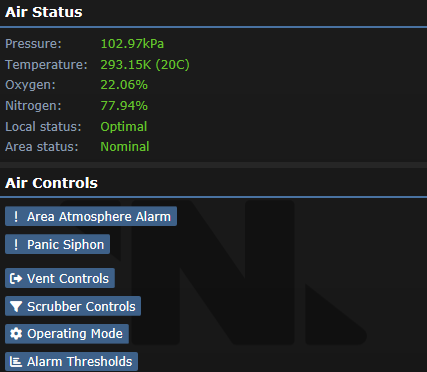
Station flooded with plasma and all of the Atmos Techs and CE are incompetent and/or dead? Best to take matters into your own hands.
- Screwdriver to exposes wires.
- Click to display Air Alarm interface and Wiring interface.
- Three lights:
- The Air Alarm is locked/unlocked.
- The Air Alarm is working properly!/offline.
- The 'AI control allowed' light is on/off.
- Five wires:
- Access wire: Pulsing toggles the interface's ID lock. Cutting locks the interface permanently until mended.
- Siphon wire: Pulsing toggles PANIC SIPHON on/off.
- Power wire: Pulsing disable the Air Alarm for 30(?) seconds, you can cut and mend the wire if in a hurry. Cutting the disables the Air Alarm until mended.
- AI Control wire: Pulsing will disable AI Control for 30(?) seconds. Cutting the wire disables the AI control until 30(?) seconds after mended.
- Alarm wire: Cutting starts the alarm, pulsing resets the alarm.
- Screwdriver to close wiring.
Disabled Air Alarms will show no lights.
| Name | Cutting | Mending | Pulsing |
|---|---|---|---|
| Power | Disables power. | Restores. | Disables power. Can be restored with mending. |
| Access | Locks the interface completely until mended. | Unlocks. | Toggles interface ID lock on/off. |
| Siphon | Starts PANIC SIPHON | Nothing | Toggles PANIC SIPHON on/off. |
| AI control | Disables AI control. | Restores after ~30 secs delay. | Temporarily (~30 secs) disable. |
| Alarm | Starts the alarm. | Nothing | Resets the alarm. |

The malfunctioning AI cannot siphon your air if you disable its eyes.
Cameras do not have a wire panel, simply click on the camera with the tools to hack it.
- With a screwdriver in hand, click on the camera.
- You can now do one of two things:
- Wirecutters: Cutting an open camera will disable the camera, mending it will re-enable the camera.
This will make a camera show up as "(deactivated)" in the camera list. - Multitool: Pulsing will toggle the camera's vision range from 7 tiles (the default) to 2 tiles. The AI will not receive any alerts.
- Wirecutters: Cutting an open camera will disable the camera, mending it will re-enable the camera.
The AI will receive a camera alert upon re-activation of a camera, or if it gets deactivated from brute force.

Use these tools in this order to hack a borg:
 ID Card,
  Emag or just ask the Cyborg to unlock its panel
- Crowbar the panel open
- Optional: Emag the cyborg and skip to "Afterwards" (does not work if its AI is malfunctional)
 Remove the power cell by clicking the borg with an empty hand
- Screwdriver to expose wires
- Wirecutters or Multitool to manipulate wires


Afterwards:
- Screwdriver to cover wires
 Replace the power cell
- Crowbar the panel shut
- Lock the panel with an ID Card. Cyborgs cannot lock their own panel.

Borgs have seven wires; five working ones and two duds:
| Name | Purpose | Cutting | Mending | Pulsing |
|---|---|---|---|---|
| Law sync module | Borg laws get updated when their master AI's laws do. Only works when AI link/slaving is active. | Stops the borg from receiving law updates from its AI. | Re-enables LawSync. | Synchronizes laws with the borg's AI. Borg gently chimes. |
| Intelligence link | Slaves the borg to an AI, forcing it to obey its orders. Needed for LawSync. | Unslaves the borg from its current AI and disables LawSync. | Nothing. You have to pulse the wire to slave a borg. | Allows you to pick an AI for the borg to be slaved to. |
| Camera light | Toggles the borg's camera. | Toggles the camera status and kicks out anyone using it. | Same as cutting. | Same as cutting. Borg's camera lense focuses loudly. |
| Lockdown indicator | Locks down the borg. Can also be done with a robotics console. | Enables lockdown. | Disables lockdown. | Toggles lockdown status. |
| Reset module hardware (marked "Reset Module") |
Resets the borg's module so it can pick another one. | Resets the Cyborg's module and prevents it from selecting a new one. | Allows the borg to pick a new module. | Nothing. Borg's module servos twitch. |
| Two dummy wires | Nothing | --- | --- | --- |
An emagged cyborg will have no LawSync or AI link and cannot be reset: it must be deconstructed (or blown) and rebuilt.
Remember, cyborgs are very expensive! Do not destroy them unless the cyborg is completely out of control, and resetting the AI and LawSync status doesn't work.
It's also a dick move to blow a non rogue borg. Think of it as chopping someone's arms and legs off; you'll get bwoink'd unless you did it for a good reason.

No better way to get away from it all with a joyride on a MULE! And run over some people with it too.
- Unlock the controls with a Quartermaster's/Cargo Technician's/Head Of Personnel's/Captain's ID.
- Unscrew the maintenance panel with the screwdriver.
- See the table below and hack what you want.
- Screw the panel back on.
| Name | Cutting | Mending | Pulsing |
|---|---|---|---|
| Power (2 wires) | One or both cut = disables power. | Restores. | The charge light flickers. -message. |
| Motor (2 wires) | One cut = increases speed slightly. Other cut = increases speed greatly. Both cut = disables motor. |
Restores. | The drive motor whines briefly. -message. |
| Radio (4 wires) | One or more cut = disables PDA control. | Restores. | You hear a radio crackle. -message. |
| Safety | Disables safety, awakens thirst for blood. (DON'T DO THIS UNLESS YOU'RE A TRAITOR OR WANT TO DIE) |
Restores. | The external warning lights flash briefly. -message. |
| Load | Allows non-standard cargo (people, cyborgs, and other bots). | Disables. | The load platform clunks. -message. |

Who wants to unlock contraband?
This allows you to order contraband (for example advanced clowning supplies). This will not unlock as many crates as an Emag. Also lets you sell non-bounty organs (for tiny prices).
- Disassemble the Supply Shuttle Console with your screwdriver, crowbar and wirecutters
- Grab the supply computer circuitboard
- Multitool it and set its receiver to the appropriate spectrum
- Put it back in and reassemble the console. You can now order and sell contraband!
(Note that contraband is illegal. Security can do whatever they wish to it, and therefore you for bringing it on board)

Unhappy with your requests priority level? Crank it up to 'EXTREME'!
- Crowbar the requests console panel open.
- Use your screwdriver to enable the hidden priority level.
- Close the panel with your crowbar.
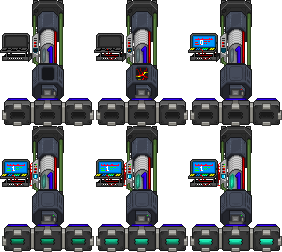
What safer way to release the singularity than doing it REMOTELY! That, or you can hack it to make it shoot more powerful particles!
- Setup the PA if you haven't already, then use a screwdriver on the computer to open the panel/expose the wires.
- Now click on the computer with a hand to bring up the wire menu. Here you can then get your tools in hand.
- Power wire: Pulsing toggles the PA on or off, cutting it will disable the PA and stop it from turning on.
- Strength wire: Pulsing increases the strength of the PA, cutting it will set the strength to 0 and prevent people turning it up.
- Interface wire: Interface wire will stop people being able to use the control computer. Pulsing will toggle this, cutting will turn it off until mended.
- Limit wire: Cutting will allow the PA to be turned up to strength 3. When pulsed it will make a large whirring noise.
- Nothing wire: Will do nothing, it's just here to make it harder.
- Close the panel for the PA to then work again. IMPORTANT: Don't forget to scan the parts again.
You can also attach a Signaler to these wires to release the singularity, such as remotely pulsing the strength wire. Bonus points if you also pulse the interface wire so that people can't stop it!
| Name | Cutting | Mending | Pulsing |
|---|---|---|---|
| Power | Disables power. | Restores. | Toggles power on/off. |
| Strength | Sets strength to 0 and prevents people from turning it up. | Restores. | Increases the strength. |
| Interface | Stops people from being able to use the control computer. | Restores. | Toggles interface off/on. |
| Limit | Allows PA to be turned up to strength 3. | Restores. | Makes a large whirring noise. |
| Nothing | Nothing. | Nothing. | Nothing. |
How To
- Set up the Particle Accelerator
- Screwdriver the monitor open
- Pulse the wires from up to down until you get the prompt stating that there's a whirring sound
- Cut the wire which prompted the statement
- Pulse the wires from up to down except for the limit wire
- Set up the tesla
Can easily be done in <30 seconds
Файл:Emitter On.gif Particle Emitter
There is only one wire: Pulse it to fire the emitter.

A bomb! Are you a bad enough dude?
- Check the description of the bomb to see if you have enough time left to even attempt a defusal. Use your best judgement for how much time you will need.
- If the timer is very long, you might want to ask toxins for a bomb suit in case you fail. You'll still be killed, but at least you'll leave a cloneable corpse.
- Screwdriver in hand, click on the bomb to open the panel and expose the wiring.
- With multitool, wirecutters, or an empty hand, click on the bomb to access the wiring.
- CAREFULLY fiddle with the wires by pulsing to test each one and cutting what you need to.
- Boom wire: Pulsing will explode the bomb instantly if the bomb is live and cutting will do much the same! There's no way to prepare for the boom wire if the bomb is already live, it's just an inherent risk. Cutting a boom wire that's not live will make the bomb unusable.
- Bolt wire: Pulsing will hint at this wire's function, cutting will release the bolts holding the bomb down if they were activated to begin with. Ditch that bomb!
- Delay wire: Pulsing will add time to the clock of the bomb, giving you a little more breathing room.
- Proceed wire: Pulsing will reduce the clock, making your life that much harder. Cutting this wire while the bomb is live will explode the bomb!
- Activate wire: Pulsing a bomb that isn't live will start the countdown and cutting a bomb that IS live will stop the countdown. If you've identified this wire, you've won!
Keep in mind that randomly cutting live bomb wires carries a 40% risk of sudden death when pulsing carries just a 20% risk of sudden death! Ultimately you will HAVE to cut a wire to stop the explosion, but with a little research with pulsing you can improve your success rate. There's a test bomb in the armory if you want to practice without the risk of boom. At end of the day, your chance to blow yourself up by a mistake is 50% when using a multitool first, and 66.66% if you just randomly cut the wires.
| Name | Cutting | Mending | Pulsing |
|---|---|---|---|
| Activate | Stops the countdown. | Nothing. | Adds time to the timer. "The bomb seems to hesitate for a moment." |
| Delay | Nothing. | Nothing. | Adds time to the timer. "The bomb chirps." |
| Bolt | Releases the bolts (if they were activated) so that the bomb can be moved. | Nothing. | "The bolts spin in place for a moment." |
| Proceed | Explodes. | Nothing, u ded. | Reduces time on the timer! "The bomb buzzes ominously!" |
| Boom | Explodes. | Nothing, u ded. | Explodes. |
| Name | Cutting | Mending | Pulsing |
|---|---|---|---|
| Activate | Nothing. | Nothing. | Starts the countdown. |
| Delay | Nothing. | Nothing. | "The bomb chirps." |
| Bolt | Releases the bolts (if they were activated) so that the bomb can be moved. | Nothing. | "The bolts spin in place for a moment." |
| Proceed | Nothing. | Nothing. | "The bomb buzzes ominously!" |
| Boom | Makes the bomb unusable. | Restores. | Nothing. |
How to remove a bomb payload
To remove the payload from a syndicate bomb (or bomb assembly crafted from 10 plasteel) follow these steps:
- Make sure the bomb is not active. If it's counting down, cutting wires can make it explode.
- Open the bomb with a screwdriver .
- Click the bomb with wirecutters and cut all wires.
- Use a crowbar on the bomb to pry out the payload.

For an awesome way to go out! These do not need to be opened with a screwdriver first.
- Only has one type of wire:
- Explode wire: When cut, it explodes. When pulsed, it explodes!
You can attach a Signaler to make a remote bomb.
| Name | Cutting | Mending | Pulsing |
|---|---|---|---|
| Explode (2 wires) | Explodes. | Nothing. | Explodes. |

The only thing worth hacking!
- Click on the vending machine to open it.
- Click on the vending machine with a screwdriver in hand to access the wiring, then get a tool in your hand.
- Button to toggle speaker on/off.
- Four lights:
- The orange light is off.Indicates the machine is electrified when on.
- The red light is blinking/off. Blinking indicate that it is working normally, off means it's in firing mode.
- The green light is off/on. Indicate that contraband is available when on.
- A purple/yellow light is on. Purple means access restrictions are on. Yellow means anyone can access.
- Four wires:
- Firing wire: If pulsed will fire stuff at people contentiously until pulsed again. Cutting causes machine to fire stuff at people contentiously until mended. Toggles the red blinking light off when in firing mode.
- Contraband wire: Cutting does nothing. When pulsed toggles availability of illegal or rare goods, also toggles the green light on/off.
- Access wire: When pulsed it toggles the purple/yellow light, allowing for ID restricted machines (med machines, sec machines, and the bartenders Booze-o-mat) to be used by anyone when the yellow light is on.
- Shock wire: Like the firing wire in effects from hacking, except it shocks instead of shoots, and toggles the orange light on. Pulsing this wire electrifies the machine for 30 seconds.
| Name | Cutting | Mending | Pulsing |
|---|---|---|---|
| Firing | Causes the machine to fire stuff at people (turns off red blinking light). | Restores. | Toggles firing on/off. |
| Contraband | Nothing. | Nothing. | Toggles illegal/rare goods availability on/off (shown by a green light). |
| Access | Activates the access restriction. | Nothing | Toggles the access restriction(purple/yellow light). |
| Shock | Causes the machine to electrocute people (shown by an orange light). | Restores. | Electrifies the machine for 30 seconds. |

 Secure Briefcase, Wall Safe


- Screwdriver in hand, click on the (briefcase/safe) to open the panel and expose the wiring
- Multitool the (briefcase/safe) until you get a confirmation that the memory is reset.
- Screwdriver the panel shut.
- If the briefcase/safe is either in its default state or its memory has been reset it will say ENTER NEW PASSCODE. Punch in a 5-digit code and click E to set it.
- Punch the same code and click E to unlock.
Click R to lock it. Locking works even if no code has been set. You can set a new code with the above steps even if it's locked. Alt-click an unlocked briefcase/safe to open it.
 Safe
Safe

A safe can be opened by doing the following while holding a stethoscope:
- Spin the dial in one direction until you hear a "tink", "krink", or "plink" from the safe.
- Spin the dial in the other direction until you hear a "tonk", "krunk", or "plunk" and a "Spring", "Sprang", "Sproing", "Clunk", or "Krunk" from the safe.
- Open.

- Screwdriver in hand, click on the radio.
- The usual radio use panel will pop up, but now with access to the wiring.
- Three wires:
- Output wire: Pulsing toggles the speaker on/off. Cutting disables the speaker without showing it.
- Input wire: Pulsing toggles the microphone on/off. Cutting disables the microphone without showing it.
- Dummy wire: Pulsing turns the microphone and speaker off, but turns them on if they are both off already. Cutting does nothing.
- Screwdriver again to close the wires.
Interestingly, Tracking Beacons also count as radios.
| Name | Cutting | Mending | Pulsing |
|---|---|---|---|
| Output | Disables speaker. | Restores. | Toggles speaker on/off. |
| Input | Disables microphone. | Restores. | Toggles microphone on/off. |
| Dummy | Nothing. | Nothing. | Toggles both the microphone and speaker on/off. |

Security Gas Mask has a hidden aggressiveness setting. Higher aggressiveness equals meaner "shitcurity" shouts coming out when the HALT-feature is used.
Use a screwdriver to change it from lowest (first) to highest (last) setting. For maximum aggressiveness, use wirecutters. Note that this can't be reset once you wirecut it.
Turn the setting to BEEPSKY MODE by using an  Emag.
Emag.

The thing nobody remembers to check.
Make sure the storage unit is closed, and then open the maintenance panel with a screwdriver.
| Name | Cutting | Mending | Pulsing |
|---|---|---|---|
| Hack | Increases decontamination power (The UV bulb is glowing). | Restores low decontamination power (The UV bulb is dim). | Toggles decontamination power (unless wire is cut). |
| Safety | Disables safety check, letting you decontaminate living people (Service light on = safety off). | Restores safety check (Service light off = safety on). | Toggles safety check. |
| High Voltage Circuit | Spark effect. | Spark effect. | Spark effect. |
| Nothing (2 wires) | Nothing. | Nothing. | Nothing. |
| Name | Status | Shows that |
|---|---|---|
| Power | The UV bulb is dim. | Low power. |
| The UV bulb is glowing. | High power. | |
| Safety | The service light is off. | Safety on. |
| The service light is on. | Safety off. |
The wires may all get cut after decontaminating on high power, or mended if already cut.
 Tesla Coil


Only one wire: Pulse it to trigger a tesla shock. Great if you attach a remote signaler!
Tips
- You can get 1000 watt powercells out of space heaters for your evil needs.
- Hacking doors: Cutting the power wire does 10 seconds to back up power. But pulsing also switches to back up power after 10 seconds, meaning if you want to open the same door for your exit you need to pulse the BACKUP wire to interrupt power. It switches back to primary after 1 minute again. Best thing is to pulse both the primary and backup then crowbar - that should give you the old style 1 minute window.
- To restore primary power to a door immediately, cut then mend the primary power wire. Cutting + mending is incredibly useful when you've accidentally electrified a door, or shorted APC power.
- Use screwdriver on mousetrap, attach to an igniter instead of a timer when making a grenade assembly, you've just made a landmine. Combine with a 100-100 potassium-water mix and anyone who steps on it will regret it.
- Singularity’s EMP can be abused to short out lockers.
- Inject plasma into a battery and insert it into a stun baton/prod. The next time someone attacks with the baton on it will blow up on them, seriously wounding both the holder and the stun target. Doing it with a high capacity battery or better will create a blast strong enough to turn the floor under the attacker to space, which will suck in the people caught in the blast and crit them before they can wake up. Use it as a suicide weapon or place it in the halls for some gullible fool to get himself killed with
if you want to be bannedif you're an antagonist. - You can emag the light replacer, which causes all of the lights to be filled with plasma which will ignite if the light bulb's turned on.
- There is a single power cable supplying the entire station with power. If you don't feel like spending crystals for a power sink and you don't get seen for a minute near engineering, you can disable the power grid so that only very competent engineers will spot your sabotage. Though this only works if the solars aren’t set up.
- You can emag buttons to remove access restrictions.
- Wall-mounted flashers and portable flashers can be disabled with wirecutters.
- If you screwdriver a heater you can take out its really crappy battery or adjust the temperature it outputs. The highest setting, 90 C, will actually hurt people extremely slowly if they aren't wearing internals.
- You can screwdriver Detectives revolver and load .357 in it, but you can get blown up by this revolver. ADDED: Remember to unload the thing while you're doing it, or you'll shoot yourself in a similar manner to sawing a loaded shotgun.
- As a traitor engineer, you could easily do the following:
- Go to a room, like a construction room, and find the APC's wire that shorts out the power.
- Grab two signalers and adjust their frequencies.
- Go to telecomms, in a hardsuit, and attach a signaler to the APC's power wire, which you found before. Close the APC and leave no traces.
- You can now disable comms any time you want for a few minutes - and unless someone checks the APC and/or doesn’t look too closely or asks the AI, they will think it was an ionospheric anomaly. HONK.
- A good way to manually disable tcomms temperately is to set the filtering frequency on the hub to some number like 0.1. It'll block everything and most engineers don't know how to fix it.
- If you want tcomms down for good, disconnect the network links. There are -very- few engineers who can fix that, and it'll take over ten minutes if they're experienced with how tcomms works. It'll probably force a shuttle call.
- Another thing that can break tcomms: changing network of the machinery. It also breaks all links. Especially if you change it from tcommsat to something like tcomms or tcommsats, which is not that obvious when you take a look at it without knowing what is the issue. And even if they relink everything again it won't work. And then even if they realize that the problem is with the network name, when they change it back, it will reset all the links again!
- If you see a pAI with a great reputation who you like, and someone else has claimed it first, use an emag to unbind it.
- If someone is hacking a door and you want to keep them from following you, and you know all or most of the wires:
- Cut 1-3 useless wires (typically some combination of Door Control, ID Wire, Timing, Safety)
- Cut the bolt lights wire
- Cut the bolts wire
- Cut every other wire except the shock wire
- Cut the shock wire
- This makes it incredibly obnoxious to follow you - if they don't know the wires and don't have insulated gloves, they're SOL because even the AI can't help them pursue.
- Cutting the shock wire doesn't shock you, as far as I have been able to tell. Mending it, on the other hand....
- If you want to test hacking doors without pissing off sec for breaking in somewhere and you have maint, you can make your own airlock with the aux tool storage thing and make it somewhere obscure.
- Put bombs in the backpacks of brain-dead or catatonic people. ADDED: Advanced version: Get mouse traps, connect one with signaler with set frequency, then make a bomb with signaler on the same frequency. Put both in backpack. Wear it or leave it somewhere/on someone. ADDED: Wizard Mode: Take your 6 max cap bomb and build 6 voice analyzers from an autolathe. Set the trigger words to "Pete", "beat", "chick", "chicky", "boom". Find 6 station bound radios, and place each of them in a backpack with a corresponding bomb hidden about the station. Sing the song that ends the station.
- The secret to hacking syndi bombs effectively is to remember that the only wire that doesn't do anything on pulse when the bomb isn't live is the boom wire (aka the one to attach a signaler to after you start the countdown for 4 hours then call attention to it).
- You can wrench syndibombs to the ground so they can't be immediately picked up and spaced.
- Deactivating cameras has them show up as (Deactivated) to anybody scrolling through cameras, but disassembling them completely removes them entirely from the list.
- You can make remote voice-activated bombs:
- Attach Voice Analyzer with a Remote Signalling Device and set a frequency and a code-phrase.
- Make a grenade or a bomb, but instead of an igniter+timer, use an igniter+signaller and set it on the same frequency of your voice signaller.
- Now the grenade/bomb will blow up once you speak the code-word!
- On a similar note, you can keep a 'revenge bomb' on you using a voice analyzer. If someone manages to send you in crit, you can whisper the code-word with your last breath (using '#'), to activate the bomb, and make your killer regret his actions.