
Взлом: различия между версиями
Дополнительные действия
Rirma4ch (обсуждение | вклад) Нет описания правки |
Rirma4ch (обсуждение | вклад) Нет описания правки |
||
| Строка 245: | Строка 245: | ||
<center>'''Воздушная сигнализация'''<br>[[File:AirAlarm.png|64px]]</center> | <center>'''Воздушная сигнализация'''<br>[[File:AirAlarm.png|64px]]</center> | ||
Станция затоплена плазмой, а все Атмостехи и CE некомпетентны и/или мертвы? Лучше взять дело в свои руки! | |||
# | #'''Открутите [[Screwdriver|отверткой]]''' '''[[File:Screwdriver_tool.png]]'''панель, чтобы обнажить проводку. | ||
#'''Пульсируйте [[Engineering_items#Multitool|мультитулом]] [[File:Multitool.png]]'''провода, чтобы узнать что они делают, а '''[[Engineering_items#Wirecutters|кусачками]] [[File:Wirecutters.png]]''' режьте. | |||
#'''Закрутите '''[[Screwdriver|'''отверткой''']] '''[[File:Screwdriver_tool.png]]'''панель на место, после получения желаемого (см. таблицу ниже) результата. | |||
# | |||
# | |||
# | |||
{| class="wikitable" style="text-align:center" | {| class="wikitable" style="text-align:center" | ||
|+ | |+Провода | ||
! | !Назначение | ||
!Cutting | !Cutting | ||
!Mending | !Mending | ||
| Строка 271: | Строка 259: | ||
|- | |- | ||
!Power | !Power | ||
| | |Отключает питание.||Восстанавливает питание.||Включает/отключает питание. | ||
|- | |- | ||
! | ! ID Scan | ||
| | |Полностью блокирует интерфейс до устранения неполадки.||Убирает блокировку.||Включает/выключает блокировку идентификатора интерфейса. | ||
|- | |- | ||
!Siphon | !Panic Siphon | ||
| | |Включает функцию PANIC SIPHON||-||Включает/выключает функцию PANIC SIPHON. | ||
|- | |- | ||
!AI | !AI Connection | ||
| | |Отключает доступ ИИ и Киборгам.||Возвращает доступ ИИ и Киборгам.||Временно (~30 сек) отключает доступ ИИ и Киборгам. | ||
|- | |- | ||
!Alarm | !Alarm | ||
| | |Включает тревогу.||Ничего не делает.||Убирает тревогу. | ||
|} | |} | ||
</div></div> | </div></div> | ||
| Строка 292: | Строка 280: | ||
<center>'''Камеры'''<br>[[File:Security_Camera.gif|64px]]</center> | <center>'''Камеры'''<br>[[File:Security_Camera.gif|64px]]</center> | ||
Неисправный ИИ не сможет выкачивать ваш воздух, если вы отключите его глаза. | |||
У камер нет проводной панели, просто нажмите на камеру инструментами, чтобы ее взломать. | |||
# | #'''Открутите [[Screwdriver|отверткой]]''' '''[[File:Screwdriver_tool.png]]'''панель, чтобы обнажить проводку. | ||
# | #Теперь вы можете сделать одно из двух: | ||
#*'''Wirecutters''': | #*'''Обрезать провода [[File:Wirecutters.png]]''': Разрезание камеры отключит её, а починка — снова включит. После этого камера будет отображаться в списке как неисправная. | ||
#*'''Multitool''': | #*'''Пульсировать[[File:Multitool.png]]''': Пульсирование переключает диапазон обзора камеры с 7 тайлов (по умолчанию) на 2. ИИ не получит никаких оповещений. | ||
ИИ получит уведомление о срабатывании камеры при ее активации или в случае ее отключения с помощью грубой силы. | |||
</div></div> | </div></div> | ||
<div class="colstr-panel"> | <div class="colstr-panel"> | ||
| Строка 308: | Строка 296: | ||
<div class="colstr-content"> | <div class="colstr-content"> | ||
<center>'''Киборги'''<br>[[File:Generic_borg.png|64px|link=Cyborg]]</center> | <center>'''Киборги'''<br>[[File:Generic_borg.png|64px|link=Cyborg]]</center> | ||
Используйте эти инструменты в указанном порядке, чтобы взломать Киборга: | |||
#[[File:Id_regular.png]] | #Разблокируйте панель Киборга, кликнув по нему картой с доступом Робототехника [[File:Id_regular.png]] , [[Емаг|Емагните]] [[File:Emag.png]] или просто попросите борга разблокировать панель. | ||
#[[File:Crowbar.png]] | #Ломом [[File:Crowbar.png]] откройте панель. | ||
#[[File:Emag.png]] | #Опционально: [[Емаг|Емагните]] [[File:Emag.png]] киборга и отправляйтесь к "После" (не сработает, если ИИ [[Guide_to_malfunction|Малф]]). | ||
# [[File:Hud-hands.gif]] | # [[File:Hud-hands.gif]] Извлеките батарейку, нажав на борг пустой рукой. | ||
#[[File:Screwdriver_tool.png]] | #Отверткой [[File:Screwdriver_tool.png]] оголите провода. | ||
#[[File:Wirecutters.png]] | #Кусачками [[File:Wirecutters.png]] или Мультитулом [[File:Multitool.png]] работайте с проводами | ||
После: | |||
#'''[[Screwdriver|отверткой]]''' '''[[File:Screwdriver_tool.png]]''' скройте провода. | |||
#Замените/вставьте обратно батарейку[[File:Power_cell.png]]. | |||
#Ломом[[File:Crowbar.png]] закройте панель. | |||
#Заблокируйте киборга картой [[File:Id_regular.png]]. Киборги не могут самостоятельно блокировать её. | |||
{| class="wikitable" style="text-align:center" | {| class="wikitable" style="text-align:center" | ||
! | !Название | ||
! | !Назначение | ||
! Cutting | ! Cutting | ||
!Mending | !Mending | ||
! Pulsing | ! Pulsing | ||
|- | |- | ||
! Law | ! AI Law Synchronization | ||
| | | Законы боргов обновляются одновременно с законами их главного ИИ. Работает только при активном режиме связи c ИИ||Не дает боргу получать обновления законодательства от своего ИИ||Восстанавливает функционал||Синхронизирует законы с искусственным интеллектом борга | ||
|- | |- | ||
! | !AI Connection | ||
| | |Привязывает борга к ИИ, заставляя его подчиняться его приказам. Требуется для AI Law Synchronization||Освобождает борга от его текущего ИИ и отключает AI Law Synchronization||Ничего||Позволяет выбрать ИИ, к которому будет привязан борг | ||
|- | |- | ||
!Camera | !Camera | ||
| | |Отвечает за камеру борга ||Выключает камеру||Включает камеру||Включает/отключает камеру | ||
|- | |- | ||
!Lockdown | !Lockdown | ||
| | |Блокирует борга. Также можно использовать консоль робототехники||Блокирует борга||Отключает блокировку||Включает/отключает блокировку | ||
|- | |- | ||
! | !Reset Module | ||
| | | Сбрасывает модуль борга, чтобы он мог выбрать другой|| Сбрасывает модуль Киборга и не позволяет ему выбрать новый||Позволяет боргу выбрать новый модуль||Ничего | ||
|- | |- | ||
! | !Два фиктивных провода | ||
| | | colspan="4" |Ничего | ||
|} | |} | ||
У [[Емаг|Емагнутых]] [[File:Emag.png]] киборгов не будет связи с ИИ и его нельзя сбросить: его нужно будет разобрать (или взорвать) и собрать заново. | |||
Старайтесь не взрывать боргов. Считайте это всё равно, что обычное убийство: вас задушат, если только вы не сделали этого по уважительной причине. | |||
</div></div> | </div></div> | ||
<div class="colstr-panel"> | <div class="colstr-panel"> | ||
| Строка 372: | Строка 356: | ||
{| class="wikitable" style="text-align:center" | {| class="wikitable" style="text-align:center" | ||
|+Wires | |+Wires | ||
! | !Название | ||
! Cutting | ! Cutting | ||
| Строка 400: | Строка 384: | ||
<center>'''Консоль заказа товаров'''<br>[[File:Supply_Shuttle_Console.png|64px]]</center> | <center>'''Консоль заказа товаров'''<br>[[File:Supply_Shuttle_Console.png|64px]]</center> | ||
WКто-то хочет заказать [[Квартирмейстер#Контрабанда|контрабанду]]? | |||
Это позволяет вам заказывать контрабанду (например, высокотехнологичные принадлежности для клоуна). Это не даст вам столько же много новых поставок, как [[Емаг]] [[File:Emag.png]] консоли. Кроме того, вы сможете продавать органы, не предназначенные для наград (по мизерным ценам). | |||
#[[ | #Доберитесь к плате консоли, при помощи отвертки '''[[File:Screwdriver_tool.png]]''', кусачек '''[[File:Wirecutters.png]]'''и лома[[File:Crowbar.png]]. | ||
# Нажмите мультитулом'''[[File:Multitool.png]]'''по плате, что бы расширить список поставок. | |||
#Multitool | #Установите плату обратно и соберите консоль. Теперь вы можете заказывать и продавать контрабанду! | ||
# | </div></div> | ||
<div class="colstr-panel"> | |||
<div class="colstr-header">[[File:Requests_Console.gif|64px|link=]] Консоль Запроса<span class="arrow">▼</span> | |||
</div> | |||
<div class="colstr-content"> | |||
<center>'''Консоль Запроса'''<br>[[File:Requests_Console.gif|64px]]</center> | |||
Недовольны уровнем приоритета ваших запросов? Поднимите его до «EXTREME»! | |||
#Откройте ломом[[File:Crowbar.png]] панель консоли запросов ломом. | |||
#Используйте отвертку '''[[File:Screwdriver_tool.png]]''', чтобы включить скрытый уровень приоритета. | |||
#Crowbar | #Закройте ломом[[File:Crowbar.png]] панель . | ||
# | |||
# | |||
</div></div> | </div></div> | ||
<div class="colstr-panel"> | <div class="colstr-panel"> | ||
| Строка 423: | Строка 409: | ||
<div class="colstr-content"> | <div class="colstr-content"> | ||
<center>'''Ускоритель частиц'''<br>[[File:ParticleAccelerator.png|64px]]</center> | <center>'''Ускоритель частиц'''<br>[[File:ParticleAccelerator.png|64px]]</center> | ||
Есть ли более безопасный способ освободить [[Сингулярность]], чем сделать это ДИСТАНЦИОННО? Можно взломать ускоритель (Дальше PA), чтобы он стрелял более мощными частицами! | |||
# | #'''Открутите [[Screwdriver|отверткой]]''' '''[[File:Screwdriver_tool.png]]'''панель на мониторе, чтобы обнажить проводку. | ||
#'''Пульсируйте [[Engineering_items#Multitool|мультитулом]] [[File:Multitool.png]]'''провода, чтобы узнать что они делают, а '''[[Engineering_items#Wirecutters|кусачками]] [[File:Wirecutters.png]]''' режьте. | |||
#'''Закрутите '''[[Screwdriver|'''отверткой''']] '''[[File:Screwdriver_tool.png]]'''панель на место, после получения желаемого (см. таблицу ниже) результата. | |||
# | #'''Не забудьте еще раз отсканировать детали!''' | ||
# | |||
# | |||
# | |||
Вы также можете прикрепить к этим проводам '''[[Signaler|Сигналлер]][[Файл:Signaler.png|ссылка=Signaler]]''', чтобы высвободить сингулярность дистанционно, подав импульс на провод '''Strength'''. Бонусные баллы будут добавлены, если вы также пошлёте импульс на провод '''Interface''', чтобы никто не смог помешать вам! | |||
{| class="wikitable" style="text-align:center" | {| class="wikitable" style="text-align:center" | ||
|+ | |+Провода | ||
! | !Название | ||
!Cutting | !Cutting | ||
!Mending | !Mending | ||
| Строка 444: | Строка 426: | ||
|- | |- | ||
!Power | !Power | ||
| | | Отключает PA||Повторно включает PA||Включает / выключает PA | ||
|- | |- | ||
!Strength | !Strength | ||
| | |Устанавливает силу на 0 и отключает возможность ее увеличения||Возвращает нормальную функциональность||Увеличивает силу PA на 1 | ||
|- | |- | ||
! Interface | ! Interface | ||
| | | Отключает управление интерфейсом, выводя консоль из строя||Включает управление интерфейсом||Переключает управление интерфейсом | ||
|- | |- | ||
!Limit | !Limit | ||
| | |Повышает максимальный предел силы до уровня 3||Возвращает настройку максимальной силы на Уровень 2||Ничего | ||
|- | |- | ||
! | !Два фиктивных провода | ||
| | | colspan="3" |Ничего | ||
|} | |} | ||
</div></div> | </div></div> | ||
<div class="colstr-panel"> | <div class="colstr-panel"> | ||
| Строка 476: | Строка 447: | ||
<center>'''Эмиттеры'''<br>[[File:Emitter.png|64px]]</center> | <center>'''Эмиттеры'''<br>[[File:Emitter.png|64px]]</center> | ||
Есть только один провод: подайте на него импульс '''[[Engineering_items#Multitool|мультитулом]] [[File:Multitool.png]]''', чтобы включить излучатель. | |||
</div></div> | </div></div> | ||
<div class="colstr-panel"> | <div class="colstr-panel"> | ||
| Строка 484: | Строка 455: | ||
<center>'''Бомбы'''<br>[[File:Syndicate_Bomb.gif|64px]]</center> | <center>'''Бомбы'''<br>[[File:Syndicate_Bomb.gif|64px]]</center> | ||
Бомба! Ты достаточно крутой парень? | |||
# | # '''Проверьте таймер''' - Если времени еще много, вы можете (вы захотите) попросить костюм разминирования. Если же мало - достигните минимального безопасного расстояния (или постарайтесь не поддаться уговорам). | ||
# Используйте '''Отвертку [[File:Screwdriver_tool.png]]''' для вскрытия защитного люка проводов. | |||
# Взламывайте используя '''Мультитул[[File:Multitool.png]]''' или '''Кусачки [[File:Wirecutters.png]]''' . | |||
# '''Удачи''' | |||
# | |||
# | |||
# | |||
Если разрезать провода бомбы, вероятность срабатывания составляет 2 из 5 (40%). При пульсировании - только 1 из 5 (20%) - хотя вам нужно будет перерезать провод активации, когда вы его найдете. В любом случае будьте осторожны и слушайте сообщения после каждого взлома провода. | |||
{| class="wikitable" style="text-align:center" | {| class="wikitable" style="text-align:center" | ||
!Название | |||
! | |||
!Cutting | !Cutting | ||
!Mending | !Mending | ||
| Строка 507: | Строка 471: | ||
|- | |- | ||
!Activate | !Activate | ||
| | |Останавливает обратный отсчет||Ничего|| | ||
1. Неактивная бомба начнет обратный отсчет <br> | |||
2. Активная бомба "seems to hesitate for a moment" по первому импульсу (таймер +10 с)<br> | |||
3. При дальнейших импульсах, "Nothing Happens." | |||
|- | |- | ||
!Delay | !Delay | ||
| | |Ничего||Ничего||Отображает сообщение, ''"The Bomb chirps.''". | ||
1. Первый импульс увеличивает таймер на 30 секунд<br> | |||
2. Дальнейшие импульсы не действуют | |||
|- | |- | ||
!Bolt | !Bolt | ||
| | |Снимает напольные болты, если они развернуты.||Ничего||Отображает сообщение, "The bolts spin in place for a moment." | ||
|- | |- | ||
!Proceed | !Proceed | ||
| | |Смерть||Вы умерли ||Отображает сообщение, ''"The bomb buzzes ominously!''" | ||
1. Если таймер превышает 60 с, таймер уменьшается на 60<br> | |||
2. Если таймер больше 20, таймер уменьшается на 10<br> | |||
3. Если таймер находится между 10 и 20, таймер установится на 10 секунд<br> | |||
4. Нет эффекта, если таймер меньше 10 секунд | |||
|- | |- | ||
!Boom | !Boom | ||
| | |Смерть||Вы умерли||Смерть | ||
|} | |} | ||
==== Как удалить ядро бомбы ==== | |||
Чтобы извлечь ядро из бомбы синдиката (или сборки бомбы, изготовленной из 10 пластали), выполните следующие действия: | |||
# | #Убедитесь, что бомба не активирована. Если идёт обратный отсчёт, перерезание проводов может привести к её взрыву. | ||
# | #Откройте бомбу с помощью отвертки [[File:Screwdriver_tool.png]]. | ||
# | #Перережьте все провода кусачками [[File:Wirecutters.png]]. | ||
# | #Примените лом [[File:Crowbar.png]] на бомбе, чтобы вытащить ядро. | ||
</div></div> | </div></div> | ||
<div class="colstr-panel"> | <div class="colstr-panel"> | ||
| Строка 558: | Строка 509: | ||
<center>'''С4'''<br>[[File:C4.gif|64px]]</center> | <center>'''С4'''<br>[[File:C4.gif|64px]]</center> | ||
# Два провода и оба подрывают при любом взаимодействии. | |||
Вы можете прикрепить Сигналлер[[Файл:Signaler.png|ссылка=Signaler]], чтобы создать бомбу с дистанционным управлением. | |||
</div></div> | </div></div> | ||
<div class="colstr-panel"> | <div class="colstr-panel"> | ||
| Строка 581: | Строка 519: | ||
<center>'''Вендоматы'''<br>[[File:Vendmed.gif|64px]]</center> | <center>'''Вендоматы'''<br>[[File:Vendmed.gif|64px]]</center> | ||
#'''Открутите [[Screwdriver|отверткой]]''' '''[[File:Screwdriver_tool.png]]'''панель, чтобы обнажить проводку. | |||
#'''Пульсируйте [[Engineering_items#Multitool|мультитулом]] [[File:Multitool.png]]'''провода, чтобы узнать что они делают, а '''[[Engineering_items#Wirecutters|кусачками]] [[File:Wirecutters.png]]''' режьте. | |||
#'''Закрутите '''[[Screwdriver|'''отверткой''']] '''[[File:Screwdriver_tool.png]]'''панель на место, после получения желаемого (см. таблицу ниже) результата. | |||
# | |||
# | |||
# | |||
# | |||
{| class="wikitable" style="text-align:center" | {| class="wikitable" style="text-align:center" | ||
|+ | |+Провода | ||
! | !Название | ||
!Cutting | !Cutting | ||
!Mending | !Mending | ||
! Pulsing | ! Pulsing | ||
|- | |- | ||
! | !Throw | ||
| | |Отключены предохранители, автомат начинает бросаться вещами||Ремонт предохранителей, автомат приходит в норму||Включает / выключает защиту | ||
|- | |- | ||
! Contraband | ! Contraband | ||
| | |Отключает контрабанду, если она включена ||Без эффекта|| Включает доступ к контрабанде. Green light on - контрабанда включена | ||
|- | |- | ||
! | !ID Scan | ||
| | |Отключено сканирование ID, разблокировка производителя||Повторно включает сканирование идентификаторов, блокируя поставщика||Включает / выключает сканирование ID | ||
|- | |- | ||
! | !High Voltage Ground | ||
| | |Электрифицирует автомат до тех пор, пока он не будет отремонтирован||Снимает всю электрификацию на устройстве||Электрифицирует автомат на 30 секунд | ||
|} | |} | ||
</div></div> | </div></div> | ||
| Строка 623: | Строка 549: | ||
<center>'''Защищенные хранилища'''<br>[[File:secure.png|64px]][[File:safe.png|64px]]</center> | <center>'''Защищенные хранилища'''<br>[[File:secure.png|64px]][[File:safe.png|64px]]</center> | ||
#Screwdriver | #'''Открутите [[Screwdriver|отверткой]]''' '''[[File:Screwdriver_tool.png]]'''панель, чтобы обнажить проводку. | ||
#Multitool | #'''Сбросьте пароль [[Engineering_items#Multitool|мультитулом]] [[File:Multitool.png]]'''. | ||
#Screwdriver | #'''Закрутите '''[[Screwdriver|'''отверткой''']] '''[[File:Screwdriver_tool.png]]'''панель на место. | ||
# | #Теперь портфели/сейф запросит поставить новый пароль. Введите пятизначный код и нажмите Е, чтобы установить его. | ||
# | #Введите тот же код и нажмите E, чтобы разблокировать. | ||
</div></div> | </div></div> | ||
<div class="colstr-panel"> | <div class="colstr-panel"> | ||
| Строка 637: | Строка 561: | ||
<center>'''Сейф'''<br>[[File:Vaultsafe.png|64px]]</center> | <center>'''Сейф'''<br>[[File:Vaultsafe.png|64px]]</center> | ||
Cейф можно открыть, выполнив следующие действия, держа в руках [[file:stethoscope.png]]: | |||
# | |||
# | Сейф можно открыть, выполнив следующие действия, держа в руках стетоскоп [[:Файл:Stethoscope.png|Stethoscope.png]]: | ||
# | #Поворачивайте диск влево, пока не услышите "tink", "krink", или "plink". | ||
#Поворачивайте диск вправо, пока не услышите "tonk", "krunk", или "plank" . | |||
#Вращайте диск в другую сторону, пока не услышите звук "Spring", "Sprang", "Sproing", "Clunk", или "Krunk" из сейфа. | |||
#Открывайте. | |||
</div></div> | </div></div> | ||
<div class="colstr-panel"> | <div class="colstr-panel"> | ||
| Строка 648: | Строка 576: | ||
<center>'''Радио'''<br>[[File:Station_Bounced_Radio.png|64px]]</center> | <center>'''Радио'''<br>[[File:Station_Bounced_Radio.png|64px]]</center> | ||
# | #'''Открутите [[Screwdriver|отверткой]]''' '''[[File:Screwdriver_tool.png]]'''провода, чтобы обнажить проводку. | ||
#'''Пульсируйте [[Engineering_items#Multitool|мультитулом]] [[File:Multitool.png]]'''провода, чтобы узнать что они делают, а '''[[Engineering_items#Wirecutters|кусачками]] [[File:Wirecutters.png]]''' режьте. | |||
#'''Закрутите '''[[Screwdriver|'''отверткой''']] '''[[File:Screwdriver_tool.png]]'''провода на место, после получения желаемого (см. таблицу ниже) результата. | |||
Интересно, что маяки слежения также считаются радиостанциями. | |||
# | |||
# | |||
{| class="wikitable" style="text-align:center" | {| class="wikitable" style="text-align:center" | ||
|+ | |+Провода | ||
! | !Название | ||
!Cutting | !Cutting | ||
!Mending | !Mending | ||
| Строка 665: | Строка 589: | ||
|- | |- | ||
!Output | !Output | ||
| | |Отключает динамик||Восстанавливает функционал||Включает/выключает динамик | ||
|- | |- | ||
!Input | !Input | ||
| | |Отключает микрофон.||Восстанавливает функционал||Включает/выключает микрофон | ||
|- | |- | ||
!Dummy | !Dummy | ||
| | | colspan="2" | Ничего||Включает/выключает микрофон и динамик | ||
|} | |} | ||
</div></div> | </div></div> | ||
<div class="colstr-panel"> | <div class="colstr-panel"> | ||
<div class="colstr-header">[[File:Security_Gas_Mask.png|64px|link=]]Офицерская | <div class="colstr-header">[[File:Security_Gas_Mask.png|64px|link=]]Офицерская газмаска<span class="arrow">▼</span> | ||
</div> | </div> | ||
<div class="colstr-content"> | <div class="colstr-content"> | ||
<center>'''Офицерская | <center>'''Офицерская газмаска'''<br>[[File:Security_Gas_Mask.png|64px]]</center> | ||
У СБ противогаза есть скрытая настройка агрессивности. Чем выше агрессивность, тем более злобные крики «щитсека» раздаются при использовании функции HALT. | |||
С помощью отвёртки '''[[File:Screwdriver_tool.png]]''' изменяйте фразы. Для максимальной агрессивности используйте кусачки'''[[File:Wirecutters.png]]'''. Обратите внимание, что после перекусывания '''[[File:Wirecutters.png]]''' сбросить это положение невозможно. | |||
[[Emag|Емаг]] [[File:Emag.png]] изменит обычные фразы на длинную цепочку ругательств. | |||
</div></div> | </div></div> | ||
<div class="colstr-panel"> | <div class="colstr-panel"> | ||
| Строка 692: | Строка 617: | ||
<center>'''Хранилища костюмов'''<br>[[File:Suit_Storage_Unit.png|64px]]</center> | <center>'''Хранилища костюмов'''<br>[[File:Suit_Storage_Unit.png|64px]]</center> | ||
То, что никто не пойдет проверять. | |||
# '''Убедитесь''', что отсек для хранения закрыт. | |||
# '''Открутите [[Screwdriver|отверткой]]''' '''[[File:Screwdriver_tool.png]]'''провода, чтобы обнажить проводку. | |||
#'''Пульсируйте [[Engineering_items#Multitool|мультитулом]] [[File:Multitool.png]]'''провода, чтобы узнать что они делают, а '''[[Engineering_items#Wirecutters|кусачками]] [[File:Wirecutters.png]]''' режьте. | |||
#'''Закрутите '''[[Screwdriver|'''отверткой''']] '''[[File:Screwdriver_tool.png]]'''провода на место, после получения желаемого (см. таблицу ниже) результата. | |||
{| class="wikitable" style="text-align:center" | {| class="wikitable" style="text-align:center" | ||
|+ | |+Провода | ||
! | !Название | ||
! Cutting | ! Cutting | ||
! Mending | ! Mending | ||
| Строка 705: | Строка 633: | ||
|- | |- | ||
!Hack | !Hack | ||
| | |Увеличивает эффективность дезинфекци | ||
[The UV bulb is glowing] | |||
|Восстанавливает низкую мощность дезинфекцию | |||
[The UV bulb is dim] | |||
|Меняет режим дезинфекции | |||
|- | |- | ||
!Safety | !Safety | ||
| | |Отключает проверку безопасности, позволяя проводить дезинфекцию живых людей | ||
[The service light is off] | |||
|Включает безопасность | |||
[The service light is on] | |||
| Включает/выключает проверку безопасности | |||
|- | |- | ||
!High Voltage Circuit | !High Voltage Circuit | ||
| | | colspan="3" |Эффект искр | ||
|- | |- | ||
!Nothing (2 wires) | !Nothing (2 wires) | ||
| | | colspan="3" |Ничего | ||
| | |||
|} | |} | ||
</div></div> | </div></div> | ||
<div class="colstr-panel"> | <div class="colstr-panel"> | ||
| Строка 744: | Строка 659: | ||
<center>'''Тесла катушки'''<br>[[File:Tesla_coil.gif|64px]]</center> | <center>'''Тесла катушки'''<br>[[File:Tesla_coil.gif|64px]]</center> | ||
Всего один провод: подайте на него импульс'''[[File:Multitool.png]]''', чтобы вызвать разряд тока Теслы. Отлично, если вы подключите дистанционный сигнализатор[[Файл:Signaler.png|ссылка=Signaler]]! | |||
</div></div> | </div></div> | ||
Версия от 11:39, 21 сентября 2025
Ваши "Товарищи"
 Изолированные перчатки для полного гашения ударов током.
 Grey Bull делает вас неуязвимым к ударам тока на короткое время
  Отвёртка для вскрытия панелей.
 Кусачки для резки[Cut] и соединения[Mend] проводов.
 Мультитул для дачи импульса[Pulse] по проводам. Не обязателен для большинства взломов, но очень упрощает жизнь.
 Cигналлер можно использовать как колхозную альтернативу мультитулу и для дистанционной подачи импульсов на провода. Прикрепите(attach) один из них к проводу, а затем используйте второй сигналлер для подачи импульсов на этот провод.
 Чертежи станции содержат в себе информацию о всех проводах во взламываемых устройствах. Крайне полезная вещь, если вы не хотите заниматься ручным перебором всех проводов во всех устройствах.
- Инженеры(не атмостехи) видят, за что отвечают провода.

Взлом
 Шлюзы▼
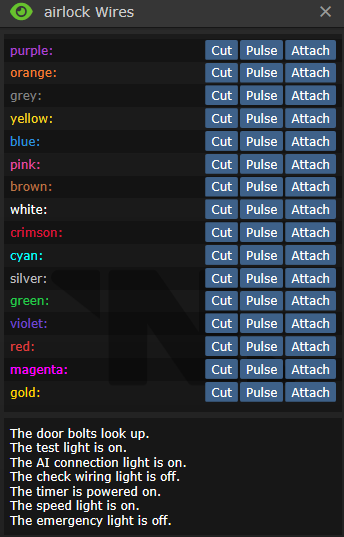
Провода магическим образом меняются местами в начале каждой смены ДЛЯ КАЖДОГО ОТДЕЛА. Например, если оранжевый провод переключает болты на шлюзе в инженерном отделе, то этот же провод будет делать то же самое на других шлюзах, НО ТОЛЬКО В ЭТОМ ЖЕ ОТДЕЛЕ.
Помните, что отключение питания двери приведет к прекращению работы всего остального.
- Держа отвёртку в руках, откройте панель шлюза, чтобы обнажить провода управления.
- Нажмите с помощью мультитулаили кусачек , чтобы получить доступ к проводам.
- Держа мультитул в активной руке, нажмите [pulse] чтобы подать импульс на провод, или держа кусачки нажмите [cut] чтобы разрезать провод.
- Снова возьмите отвёртку чтобы закрутить панель обратно.
- В шлюзе имеются два основных и два дополнительных провода питания.
- Отключение любого основного провода питания (импульсом или перекусыванием) приведет к тому, что резервное (aux) питание заработает через 10 секунд. Отключение как основного, так и вспомогательного провода питания приведет к потере питания двери до тех пор, пока не будет восстановлено основное или вспомогательное питание.
- Когда дверь обесточена, её можно открыть при помощи Ломика
 , если конечно болты не выдвинуты.
- Когда дверь обесточена, её можно открыть при помощи Ломика
- Отключение провода контроля ИИ приведёт к невозможности взаимодействия с этой дверью ИИ и киборгов. Однако, они всё равно смогут взломать эту дверь рано или поздно. Процесс занимает около минуты, позволяя синтетикам пользоваться дверью, даже если соответствующий провод отключен.
| Провода | |||
|---|---|---|---|
| Название | Cut | Mending | Pulse |
| Main Power x2 | Отключает основное питание. Может ударить током, но не электризует дверь. | Восстанавливает основное питание шлюза. Может ударить током, но не электризует дверь. | Отключает основное питание на минуту. Повторный импульс бесполезный. |
| Auxiliary Power x2 | Отключает резервное питание. Может ударить током, но не электризует дверь. | Восстанавливает резервное питание шлюза. Может ударить током, но не электризует дверь. | Отключает резервное питание на минуту. Повторный импульс бесполезный. |
| ID Scan | Дверь отказывает в доступе всем без исключений, если на её плате есть хоть какие-то ограничения. Однако, если в таком состоянии дать импульс на провод open(открытие), дверь распахнётся. | Восстанавливает прежний режим работы сканера ID. | Дверь будет пищать и мигать лампочками, будто к её пытается открыть кто-то без доступа. |
| Bolts | Опускает болты. | - | Меняет положение болтов. |
| Bolt Lights | Отключает индикацию состояния болтов. Делая невозможным визуальное определение их положения. | Возвращает индикацию в рабочее состояние. | Переключает индикацию, но не сами болты. |
| Open | - | - | Открывает дверь, но только если на плате управления конкретной двери не установлено никаких ограничений, либо провод ID scan(сканирование ID) перерезан. |
| AI Connection | Отключает синтетикам возможность управления дверью. | Возвращает синтетикам возможность управления дверью. | На мгновение отбирает у ИИ контроль. |
| High Voltage Ground | Наэлектризовывает дверь. Является защитным механизмом от взлома. При попытке любых взаимодействий с дверью, оная бьёт током взломщика и искрит, привлекая внимание. Чем больше резервная мощность в электросети станции, тем сильнее удар током. | Снимает электрификацию. | Электризует дверь на 30 секунд. |
| High Voltage Circuit x2 | С высокой вероятностью бьёт взломщика током, но не электризует дверь. | С высокой вероятностью бьёт взломщика током, но не электризует дверь. | - |
| Safety | Отключает датчик присутствия, позволяя двери закрываться, даже если в ней кто-то стоит. | Возвращает датчик в рабочее положение. | Переключает режим датчика. |
| Timing | Отключает таймер, отвечающий за закрытие двери. После открытия дверь больше не закроется, пока её не закроют в ручную, при наличии соответствующего доступа. | Возвращает таймер в рабочее положение. | Переключает время до закрытия.
Выкл - долгое закрытие Вкл - быстрое закрытие Невозможно переключить, если провод обрезан. |
| Nothing x2 | - | ||
| Определяем состояние двери по индикаторам в панели | ||
|---|---|---|
| Название лампочки | Статус | Это значит что... |
| Bolts | The door bolts look up. | Болты подняты (открыто). |
| The door bolts have fallen! | Болты опущены (блокировка). | |
| Power | The test light is on. | Есть питание |
| The test light is off. | Дверь обесточена (можно открыть при помощи лома  ). ).
| |
| AI Connection | The AI connection light is on. | ИИ контролирует дверь в штатном режиме. |
| The AI connection light is off. | ИИ не может контролировать дверь. | |
| Safety | The 'Check Wiring' light is on. | Датчик присутствия отключен (дверь крошит экипаж). |
| The 'Check Wiring' light is off. | Датчик присутствия включен (дверь не крошит экипаж). | |
| Timer | The timer is powered on. | Дверь может закрыться сама. |
| The timer is powered off. | Дверь не может закрыться сама. | |
| Timing | The speed light is on. | Дверь на долгой задержке (закрывается через время). |
| The speed light is off. | Дверь на короткой задержке (закрывается как только через неё прошли). | |
| Emergency light | The emergency light is on. | Включен аварийный доступ (дверь откроется даже тому у кого нет карты). |
| The emergency light is off. | Аварийный доступ отключен (дверь проверяет доступ на карте). | |
Некоторые шлюзы имеют защиту от взлома, в виде листа прочного материала между крышкой панели и проводами. Степень защиты можно определить осмотрев шлюз.
|
Чтобы защитить панель шлюза, примените два листа |
Чтобы максимально защитить панель шлюза, примените два листа |
| |


Некоторые отдельные шлюзы являются специальными "шлюзами с аварийным открытием", что означает, что их можно открыть голыми руками, после задержки, в обесточенном состоянии, а не с помощью ломика . Некоторые шлюзы в отсеках общественного пользования обладают такой опцией.
 АПЦ▼
АПЦ▼
Контролирует электропитание в назначенном помещении. Все АПЦ могут управляться через компьютеры мониторинга питания, независимо от состояния блокировки, так что надейтесь, что тот, кто возится с питанием, не обращает на это внимания.
- Возьмите Отвертку(screwdriver) в руки, нажмите на АПЦ, чтобы открыть панель и обнажить проводку.
- Свободной рукой получите доступ к проводам.
- Мультитулом(multitool) пульсируйте провода, чтобы узнать что они делают, а кусачками(wirecutters) режьте.
- Закрутите(screwdriver) панель на место, после получения желаемого (см. таблицу ниже) результата.
- Блокировка крышки АПЦ не позволит получить доступ к аккумулятору. Крышка автоматически блокируется при закрытии. Открывать и закрывать крышку можно ломом(crowbar) .
- Блокировка интерфейса АПЦ не позволит никому им пользоваться, в том числе снимать блокировку крышки. Тем не менее, открыть панель отвёрткой всегда можно. Блокировка снимается любой ID-картой с инженерным доступом.
| Назначение | Перерезание | Соединение | Импульс |
|---|---|---|---|
| Power (2 wires)
(Питание (2 провода)) |
Отключает питание. Может ударить током. | Включает питание. Может ударить током. | Отключает питание на две минуты. Разрежьте и соедините провод, чтобы восстановить питание сразу. |
| ID lock
(Сканнер ID) |
Отключает возможность переключить режим блокировки с помощью ID-карты | Возвращает сканнер в прежнее состояние | Снимает блокировку АПЦ на 30сек. |
| AI control
(Управление ИИ) |
Отключает возможность управления для ИИ и киборгов. | Возвращает контроль для синтетиков | На мгновение отключает возможность управления для ИИ и киборгов. |
| Индикатор | Состояние индикатора | Означает что: |
|---|---|---|
| Lock | The interface light is red. | АПЦ заблокирован |
| The interface light is green. | АПЦ разблокирован | |
| Power | The short indicator is on. | АПЦ не работает |
| The short indicator is off. | АПЦ работает | |
| AI control | The AI connection light is off. | ИИ утратил контроль над этим АПЦ |
| The AI connection light is on. | ИИ управляет этим АПЦ |
 Печатающие машины▼


- Кликните по машинерии, отвёрткой(screwdriver) чтобы открыть панель.
- Тут всего два провода, которые нас интересуют. Первый - питание, его лучше не трогать, второй - ограничитель. Вот как раз ограничитель и нужно отключить. Свидетельством отключения ограничителя служит горящий синий индикатор в панели индикаторов. Остальные провода ничего не делают, но могут ударить током.
После взлома машинерии вы можете пробавляться с некоторыми новыми опциями.
| Назначение | Обрезать | Mending | Pulsing |
|---|---|---|---|
| Питание (индикатор красный, если выключено) | Отключение питания | Включение питания | Эффект как от обрезания, но только на 30сек. |
| Электрификация (Индикатор зелёный, если включено) | Электрификация | Выключение электрификации | |
| Взломанные опции (Индикатор голубой, если включено) | Удачный взлом! | Выключает взломанные функции |
 Воздушная сигнализация▼

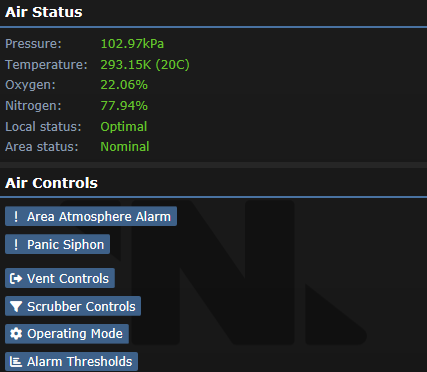
Станция затоплена плазмой, а все Атмостехи и CE некомпетентны и/или мертвы? Лучше взять дело в свои руки!
- Открутите отверткой панель, чтобы обнажить проводку.
- Пульсируйте мультитулом провода, чтобы узнать что они делают, а кусачками режьте.
- Закрутите отверткой панель на место, после получения желаемого (см. таблицу ниже) результата.
| Назначение | Cutting | Mending | Pulsing |
|---|---|---|---|
| Power | Отключает питание. | Восстанавливает питание. | Включает/отключает питание. |
| ID Scan | Полностью блокирует интерфейс до устранения неполадки. | Убирает блокировку. | Включает/выключает блокировку идентификатора интерфейса. |
| Panic Siphon | Включает функцию PANIC SIPHON | - | Включает/выключает функцию PANIC SIPHON. |
| AI Connection | Отключает доступ ИИ и Киборгам. | Возвращает доступ ИИ и Киборгам. | Временно (~30 сек) отключает доступ ИИ и Киборгам. |
| Alarm | Включает тревогу. | Ничего не делает. | Убирает тревогу. |
 Камеры▼

Неисправный ИИ не сможет выкачивать ваш воздух, если вы отключите его глаза.
У камер нет проводной панели, просто нажмите на камеру инструментами, чтобы ее взломать.
- Открутите отверткой панель, чтобы обнажить проводку.
- Теперь вы можете сделать одно из двух:
- Обрезать провода : Разрезание камеры отключит её, а починка — снова включит. После этого камера будет отображаться в списке как неисправная.
- Пульсировать: Пульсирование переключает диапазон обзора камеры с 7 тайлов (по умолчанию) на 2. ИИ не получит никаких оповещений.
- Обрезать провода
ИИ получит уведомление о срабатывании камеры при ее активации или в случае ее отключения с помощью грубой силы.
 Киборги▼
Используйте эти инструменты в указанном порядке, чтобы взломать Киборга:
- Разблокируйте панель Киборга, кликнув по нему картой с доступом Робототехника
 , Емагните
  или просто попросите борга разблокировать панель.
 - Ломом откройте панель.
- Опционально: Емагните киборга и отправляйтесь к "После" (не сработает, если ИИ Малф).
 Извлеките батарейку, нажав на борг пустой рукой.
- Отверткой оголите провода.
- Кусачками или Мультитулом работайте с проводами


После:
- отверткой скройте провода.
- Замените/вставьте обратно батарейку
 .
. - Ломом закройте панель.
- Заблокируйте киборга картой . Киборги не могут самостоятельно блокировать её.

| Название | Назначение | Cutting | Mending | Pulsing |
|---|---|---|---|---|
| AI Law Synchronization | Законы боргов обновляются одновременно с законами их главного ИИ. Работает только при активном режиме связи c ИИ | Не дает боргу получать обновления законодательства от своего ИИ | Восстанавливает функционал | Синхронизирует законы с искусственным интеллектом борга |
| AI Connection | Привязывает борга к ИИ, заставляя его подчиняться его приказам. Требуется для AI Law Synchronization | Освобождает борга от его текущего ИИ и отключает AI Law Synchronization | Ничего | Позволяет выбрать ИИ, к которому будет привязан борг |
| Camera | Отвечает за камеру борга | Выключает камеру | Включает камеру | Включает/отключает камеру |
| Lockdown | Блокирует борга. Также можно использовать консоль робототехники | Блокирует борга | Отключает блокировку | Включает/отключает блокировку |
| Reset Module | Сбрасывает модуль борга, чтобы он мог выбрать другой | Сбрасывает модуль Киборга и не позволяет ему выбрать новый | Позволяет боргу выбрать новый модуль | Ничего |
| Два фиктивных провода | Ничего | |||
У Емагнутых  киборгов не будет связи с ИИ и его нельзя сбросить: его нужно будет разобрать (или взорвать) и собрать заново.
Старайтесь не взрывать боргов. Считайте это всё равно, что обычное убийство: вас задушат, если только вы не сделали этого по уважительной причине.
 Мулботы▼

No better way to get away from it all with a joyride on a MULE! And run over some people with it too.
- Unlock the controls with a Quartermaster's/Cargo Technician's/Head Of Personnel's/Captain's ID.
- Unscrew the maintenance panel with the screwdriver.
- See the table below and hack what you want.
- Screw the panel back on.
| Название | Cutting | Mending | Pulsing |
|---|---|---|---|
| Power (2 wires) | One or both cut = disables power. | Restores. | The charge light flickers. -message. |
| Motor (2 wires) | One cut = increases speed slightly. Other cut = increases speed greatly. Both cut = disables motor. |
Restores. | The drive motor whines briefly. -message. |
| Radio (4 wires) | One or more cut = disables PDA control. | Restores. | You hear a radio crackle. -message. |
| Safety | Disables safety, awakens thirst for blood. (DON'T DO THIS UNLESS YOU'RE A TRAITOR OR WANT TO DIE) |
Restores. | The external warning lights flash briefly. -message. |
| Load | Allows non-standard cargo (people, cyborgs, and other bots). | Disables. | The load platform clunks. -message. |
 Консоль заказа товаров▼

WКто-то хочет заказать контрабанду?
Это позволяет вам заказывать контрабанду (например, высокотехнологичные принадлежности для клоуна). Это не даст вам столько же много новых поставок, как Емаг консоли. Кроме того, вы сможете продавать органы, не предназначенные для наград (по мизерным ценам).
- Доберитесь к плате консоли, при помощи отвертки , кусачек и лома.
- Нажмите мультитуломпо плате, что бы расширить список поставок.
- Установите плату обратно и соберите консоль. Теперь вы можете заказывать и продавать контрабанду!
 Консоль Запроса▼

Недовольны уровнем приоритета ваших запросов? Поднимите его до «EXTREME»!
- Откройте ломом панель консоли запросов ломом.
- Используйте отвертку , чтобы включить скрытый уровень приоритета.
- Закройте ломом панель .
 Ускоритель частиц▼

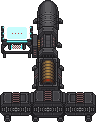
Есть ли более безопасный способ освободить Сингулярность, чем сделать это ДИСТАНЦИОННО? Можно взломать ускоритель (Дальше PA), чтобы он стрелял более мощными частицами!
- Открутите отверткой панель на мониторе, чтобы обнажить проводку.
- Пульсируйте мультитулом провода, чтобы узнать что они делают, а кусачками режьте.
- Закрутите отверткой панель на место, после получения желаемого (см. таблицу ниже) результата.
- Не забудьте еще раз отсканировать детали!
Вы также можете прикрепить к этим проводам Сигналлер, чтобы высвободить сингулярность дистанционно, подав импульс на провод Strength. Бонусные баллы будут добавлены, если вы также пошлёте импульс на провод Interface, чтобы никто не смог помешать вам!
| Название | Cutting | Mending | Pulsing |
|---|---|---|---|
| Power | Отключает PA | Повторно включает PA | Включает / выключает PA |
| Strength | Устанавливает силу на 0 и отключает возможность ее увеличения | Возвращает нормальную функциональность | Увеличивает силу PA на 1 |
| Interface | Отключает управление интерфейсом, выводя консоль из строя | Включает управление интерфейсом | Переключает управление интерфейсом |
| Limit | Повышает максимальный предел силы до уровня 3 | Возвращает настройку максимальной силы на Уровень 2 | Ничего |
| Два фиктивных провода | Ничего | ||
 Эмиттеры▼

Есть только один провод: подайте на него импульс мультитулом  , чтобы включить излучатель.
 Бомбы▼

Бомба! Ты достаточно крутой парень?
- Проверьте таймер - Если времени еще много, вы можете (вы захотите) попросить костюм разминирования. Если же мало - достигните минимального безопасного расстояния (или постарайтесь не поддаться уговорам).
- Используйте Отвертку для вскрытия защитного люка проводов.
- Взламывайте используя Мультитул или Кусачки .
- Удачи
Если разрезать провода бомбы, вероятность срабатывания составляет 2 из 5 (40%). При пульсировании - только 1 из 5 (20%) - хотя вам нужно будет перерезать провод активации, когда вы его найдете. В любом случае будьте осторожны и слушайте сообщения после каждого взлома провода.
| Название | Cutting | Mending | Pulsing |
|---|---|---|---|
| Activate | Останавливает обратный отсчет | Ничего |
1. Неактивная бомба начнет обратный отсчет |
| Delay | Ничего | Ничего | Отображает сообщение, "The Bomb chirps.".
1. Первый импульс увеличивает таймер на 30 секунд |
| Bolt | Снимает напольные болты, если они развернуты. | Ничего | Отображает сообщение, "The bolts spin in place for a moment." |
| Proceed | Смерть | Вы умерли | Отображает сообщение, "The bomb buzzes ominously!"
1. Если таймер превышает 60 с, таймер уменьшается на 60 |
| Boom | Смерть | Вы умерли | Смерть |
Как удалить ядро бомбы
Чтобы извлечь ядро из бомбы синдиката (или сборки бомбы, изготовленной из 10 пластали), выполните следующие действия:
- Убедитесь, что бомба не активирована. Если идёт обратный отсчёт, перерезание проводов может привести к её взрыву.
- Откройте бомбу с помощью отвертки .
- Перережьте все провода кусачками .
- Примените лом на бомбе, чтобы вытащить ядро.
 С4▼
С4▼

- Два провода и оба подрывают при любом взаимодействии.
Вы можете прикрепить Сигналлер, чтобы создать бомбу с дистанционным управлением.
 Вендоматы▼

- Открутите отверткой панель, чтобы обнажить проводку.
- Пульсируйте мультитулом провода, чтобы узнать что они делают, а кусачками режьте.
- Закрутите отверткой панель на место, после получения желаемого (см. таблицу ниже) результата.
| Название | Cutting | Mending | Pulsing |
|---|---|---|---|
| Throw | Отключены предохранители, автомат начинает бросаться вещами | Ремонт предохранителей, автомат приходит в норму | Включает / выключает защиту |
| Contraband | Отключает контрабанду, если она включена | Без эффекта | Включает доступ к контрабанде. Green light on - контрабанда включена |
| ID Scan | Отключено сканирование ID, разблокировка производителя | Повторно включает сканирование идентификаторов, блокируя поставщика | Включает / выключает сканирование ID |
| High Voltage Ground | Электрифицирует автомат до тех пор, пока он не будет отремонтирован | Снимает всю электрификацию на устройстве | Электрифицирует автомат на 30 секунд |
 Защищенные хранилища▼


- Открутите отверткой панель, чтобы обнажить проводку.
- Сбросьте пароль мультитулом .
- Закрутите отверткой панель на место.
- Теперь портфели/сейф запросит поставить новый пароль. Введите пятизначный код и нажмите Е, чтобы установить его.
- Введите тот же код и нажмите E, чтобы разблокировать.
 Сейф▼
Сейф▼

Cейф можно открыть, выполнив следующие действия, держа в руках  :
:
Сейф можно открыть, выполнив следующие действия, держа в руках стетоскоп Stethoscope.png:
- Поворачивайте диск влево, пока не услышите "tink", "krink", или "plink".
- Поворачивайте диск вправо, пока не услышите "tonk", "krunk", или "plank" .
- Вращайте диск в другую сторону, пока не услышите звук "Spring", "Sprang", "Sproing", "Clunk", или "Krunk" из сейфа.
- Открывайте.
 Радио▼

- Открутите отверткой провода, чтобы обнажить проводку.
- Пульсируйте мультитулом провода, чтобы узнать что они делают, а кусачками режьте.
- Закрутите отверткой провода на место, после получения желаемого (см. таблицу ниже) результата.
Интересно, что маяки слежения также считаются радиостанциями.
| Название | Cutting | Mending | Pulsing |
|---|---|---|---|
| Output | Отключает динамик | Восстанавливает функционал | Включает/выключает динамик |
| Input | Отключает микрофон. | Восстанавливает функционал | Включает/выключает микрофон |
| Dummy | Ничего | Включает/выключает микрофон и динамик | |
 Офицерская газмаска▼

У СБ противогаза есть скрытая настройка агрессивности. Чем выше агрессивность, тем более злобные крики «щитсека» раздаются при использовании функции HALT.
С помощью отвёртки  изменяйте фразы. Для максимальной агрессивности используйте кусачки
 . Обратите внимание, что после перекусывания сбросить это положение невозможно.
Емаг изменит обычные фразы на длинную цепочку ругательств.
 Хранилища костюмов▼

То, что никто не пойдет проверять.
- Убедитесь, что отсек для хранения закрыт.
- Открутите отверткой провода, чтобы обнажить проводку.
- Пульсируйте мультитулом провода, чтобы узнать что они делают, а кусачками режьте.
- Закрутите отверткой провода на место, после получения желаемого (см. таблицу ниже) результата.
| Название | Cutting | Mending | Pulsing |
|---|---|---|---|
| Hack | Увеличивает эффективность дезинфекци
[The UV bulb is glowing] |
Восстанавливает низкую мощность дезинфекцию
[The UV bulb is dim] |
Меняет режим дезинфекции |
| Safety | Отключает проверку безопасности, позволяя проводить дезинфекцию живых людей
[The service light is off] |
Включает безопасность
[The service light is on] |
Включает/выключает проверку безопасности |
| High Voltage Circuit | Эффект искр | ||
| Nothing (2 wires) | Ничего | ||
 Тесла катушки▼

Всего один провод: подайте на него импульс, чтобы вызвать разряд тока Теслы. Отлично, если вы подключите дистанционный сигнализатор!